Plans and billing
What it is used for
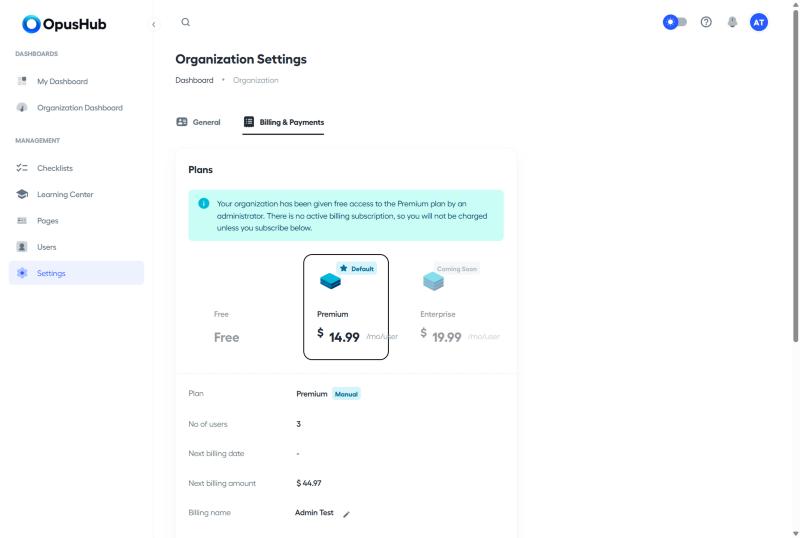
The Plans area shows your organisation's current subscription and lets admins upgrade, downgrade or update payment details. OpusHub uses Stripe for billing.
The plans
| Plan | Best for | Included |
|---|---|---|
| Starter | Individuals trying OpusHub | 1 user, 3 checklists, up to 50 Learning Centre documents |
| Premium | Teams running daily operations | Unlimited checklists, unlimited Learning Centre documents, Pages, email support |
| Enterprise | Larger organisations needing extra support | Everything in Premium, phone support, optional onsite implementation |
The plan name and pricing displayed on the pricing page come directly from Stripe so they always reflect the current configuration.
Enterprise is shown as Coming Soon and can't be selected, both on the signup plan picker and on the Change plan picker in Settings. Organisations already on Enterprise keep their current plan and features.
Who can manage billing
Only Admins can change the plan or update payment details.
Upgrade or change plan
- Open Settings.
- Open the Billing tab.
- Review the current plan, included limits and renewal date.
- Select Change plan and choose the target plan.
- Complete the Stripe checkout for paid plans.
- The new plan becomes active immediately. Limits update straight away.
Update payment method
- Open Settings > Billing.
- Use Update payment method to enter new card details.
OpusHub processes the update through Stripe, but you stay inside the app to do it — there's no separate Stripe-hosted portal to visit.
Limit messages you may see
- Starter plan allows only 1 user. Upgrade to add more users.
- Starter plan allows only 3 checklists. Upgrade to add more checklists.
- Starter plan allows only 50 learning center documents. Upgrade to add more.
These appear when you try to exceed a Starter limit. Upgrade to Premium or Enterprise to lift them.
Important notes
- Cancelling ends the paid subscription immediately and drops you back to the Starter tier straight away — it does not run until the end of the period you already paid for.
- Existing data is preserved on downgrade, but creating new items beyond the Starter limits will be blocked until you delete enough to fit, or upgrade again.
- The Starter plan price is $0 and renders as Free in the price slot on the pricing page.